Core & Supervisor
Core runs the Home Assistant application. Supervisor manages the Home Assistant OS environment and extensions. Buddy displays these components separately.
 Home Assistant hubthe foundation for home automation
Local management console
See what happens behind your home dashboard.
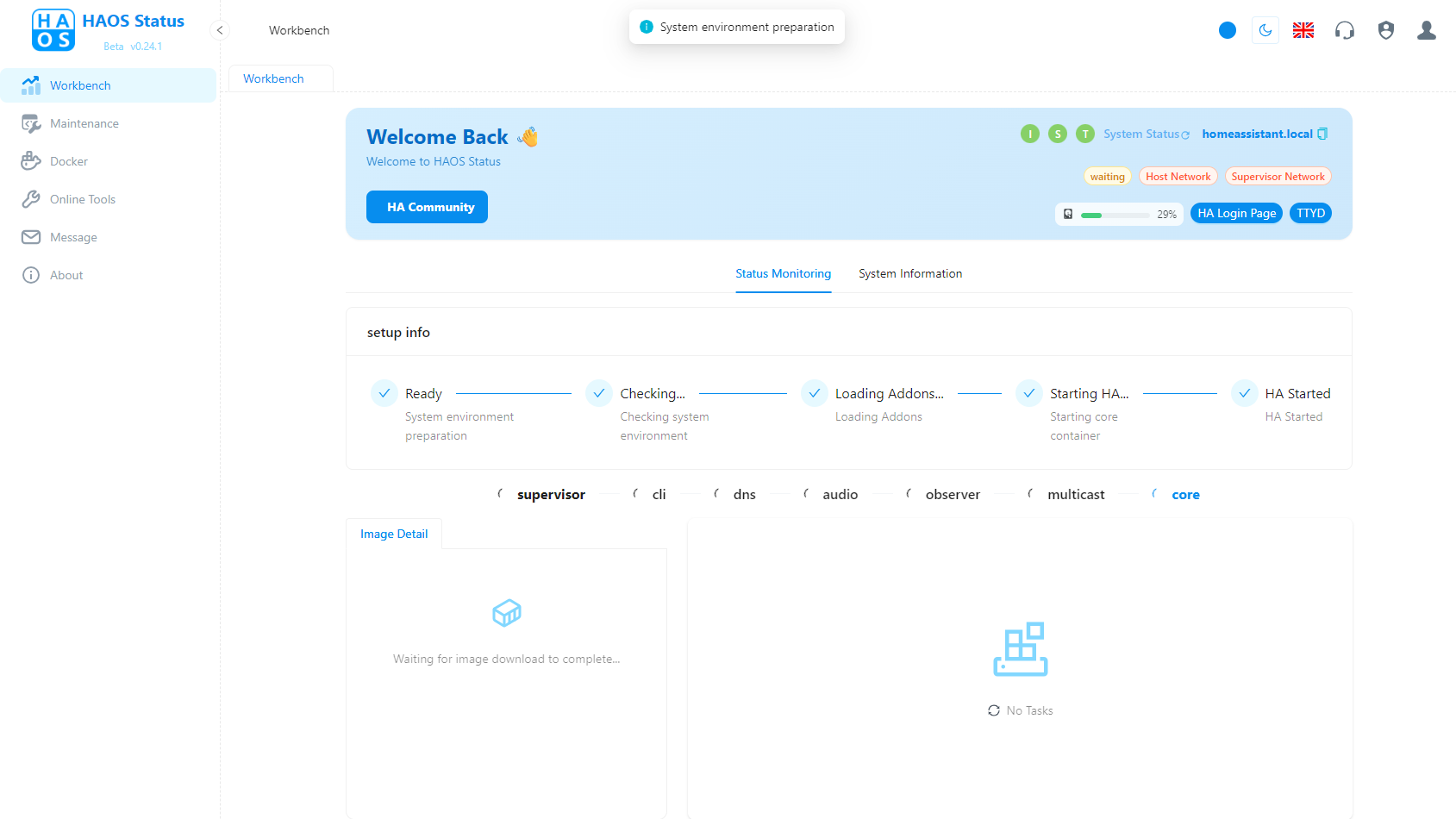
Buddy is the Home Assistant hub's additional web console. Follow startup progress, view the status of system components and access maintenance and diagnostic tools. The console runs locally and is accessible through a browser on your home network.
Two different roles
Connect devices, create automations and build dashboards. This is where you control your lights, view temperature readings and track energy data.
View the technical state of your installation: startup progress, visible system components and available management tools. Buddy is not a voice assistant or AI chatbot and does not replace your home dashboard.
The benefit is a separate overview of the installation. Home Assistant itself also offers system, log and maintenance features; Buddy brings additional controls together in its own console.
During startup
The console divides startup into recognisable stages. See what the installation is doing instead of simply waiting for the dashboard to open.
What does the overview show?
Core runs the Home Assistant application. Supervisor manages the Home Assistant OS environment and extensions. Buddy displays these components separately.
The overview includes DNS, audio, Observer and multicast. This provides context when a component is still starting or needs further investigation.
The screen shows network status, system information and progress when downloading system images. A delay does not always mean the whole installation is faulty.
Maintenance and diagnostics
The product material describes 19 management tools. Their purposes are grouped below. Available controls depend on the installed software version.
Feature names come from the supplied product material. These descriptions explain their purpose; they do not replace the instructions in the installed console.
On your own network
Connect the hub to your network and power supply. Use a phone, tablet or computer on the same network.
http://homeassistant.local:8124http://homeassistant.local/http://homeassistant.local:8123/.For a first installation, create an administrator account using Create admin and log in using Sign in. This Buddy account is separate from your Home Assistant account. Read about accounts and controls.
If the local name does not work, find the hub's IP address in your router's device list and use it with the appropriate port. The configured address may differ.
These addresses point to your own hub, not this website. Keep the management console within your trusted network and do not expose Buddy, SSH or the terminal through public port forwarding.
Practical questions
If Buddy is reachable, check the active startup stage and network overview. An image may still be downloading or a component may still be starting. If Buddy does not respond either, check power, cables, the router and the IP address first. The console is not an independent recovery computer and may itself be unreachable.
Reading status information is straightforward. Changing IP settings, accounts, versions or system services requires more knowledge. Terminal, SSH and system rebuilding are advanced features. Make a backup before any action that could change data or configuration.
No. Buddy is included on Home Assistant hub, not Home Assistant Green. Green uses the standard Home Assistant management environment without the additional Buddy console.
Yes. Buddy supports multiple languages. Select your preferred language using the language control in its interface.